Connectors
A Sprite that needs to talk to GitHub, Anthropic, OpenRouter, an S3 bucket, or any other HTTP API runs into the same problem: where does the credential live? Pasting a token into the Sprite’s environment works, but every Sprite that needs that token now holds a copy of a long-lived secret. Rotating it means touching every Sprite. Auditing access means reading process environments. Revoking it for one Sprite means revoking it for all of them.
Connectors solve this by storing the credential once, in your organization, and routing API calls through the Sprites gateway. Sprites never see the token. You decide which Sprites can use a connector and which provider endpoints they can reach.
How it works
Section titled “How it works”A connector has three pieces:
- A credential — an OAuth token, your own API key, S3 access keys, or a managed key that Sprites provisions for you. Stored encrypted in your organization’s database. The token itself is never returned by the API or shown again in the dashboard.
- An access policy — rules that decide which of your Sprites may use the connector, and which provider paths they may reach. Deny-by-default: a connector with no policy refuses every Sprite.
- A gateway endpoint —
https://api.sprites.dev/v1/gateway/<provider>/<connection_id>/<path>. A Sprite calls this URL; Sprites authenticates the call using the requesting Sprite’s identity, checks the policy, and forwards to the provider with the stored credential attached.
The Sprite never holds the provider token. It only knows the connector ID and the gateway URL.
Providers
Section titled “Providers”| Provider | Credential style | Notes |
|---|---|---|
| GitHub | OAuth | You approve access on GitHub. Default scopes are repo and read:org; add more later from the connector’s Scopes editor. |
| OpenRouter | API key (BYOK) or managed | Bring your own OpenRouter key, or enable the managed connector and pay with prepaid credits. See Managed OpenRouter. |
| Anthropic | API key (BYOK) | Calls to /v1/messages and the rest of the Anthropic API. The gateway forwards your anthropic-version and anthropic-beta headers. |
| Discourse | Forum-issued user API key | You approve access on the forum itself. The connector only ever gets your own forum permissions. |
| S3-compatible object store | Access key ID + secret | AWS S3, Cloudflare R2, Backblaze B2, MinIO, and other S3-compatible services. Requests are signed with SigV4. |
| Fly.io Machines | Fly.io token | A Custom API preset for api.machines.dev. The dashboard mints a read-only or read-write token scoped to your organization. |
| Custom API | Token + base URL | Wraps any token-authenticated HTTP API. You choose where the token goes. |
Setting up a connector
Section titled “Setting up a connector”Connector management lives in the Fly.io dashboard. Open your organization, go to Sprites, then the Connectors tab. Connections are grouped into Managed by Sprites (keys Sprites provisions for you) and Your connections (everything you added yourself). An Available services strip below lists managed connectors you haven’t enabled yet.
Click Add connector to pick a provider.
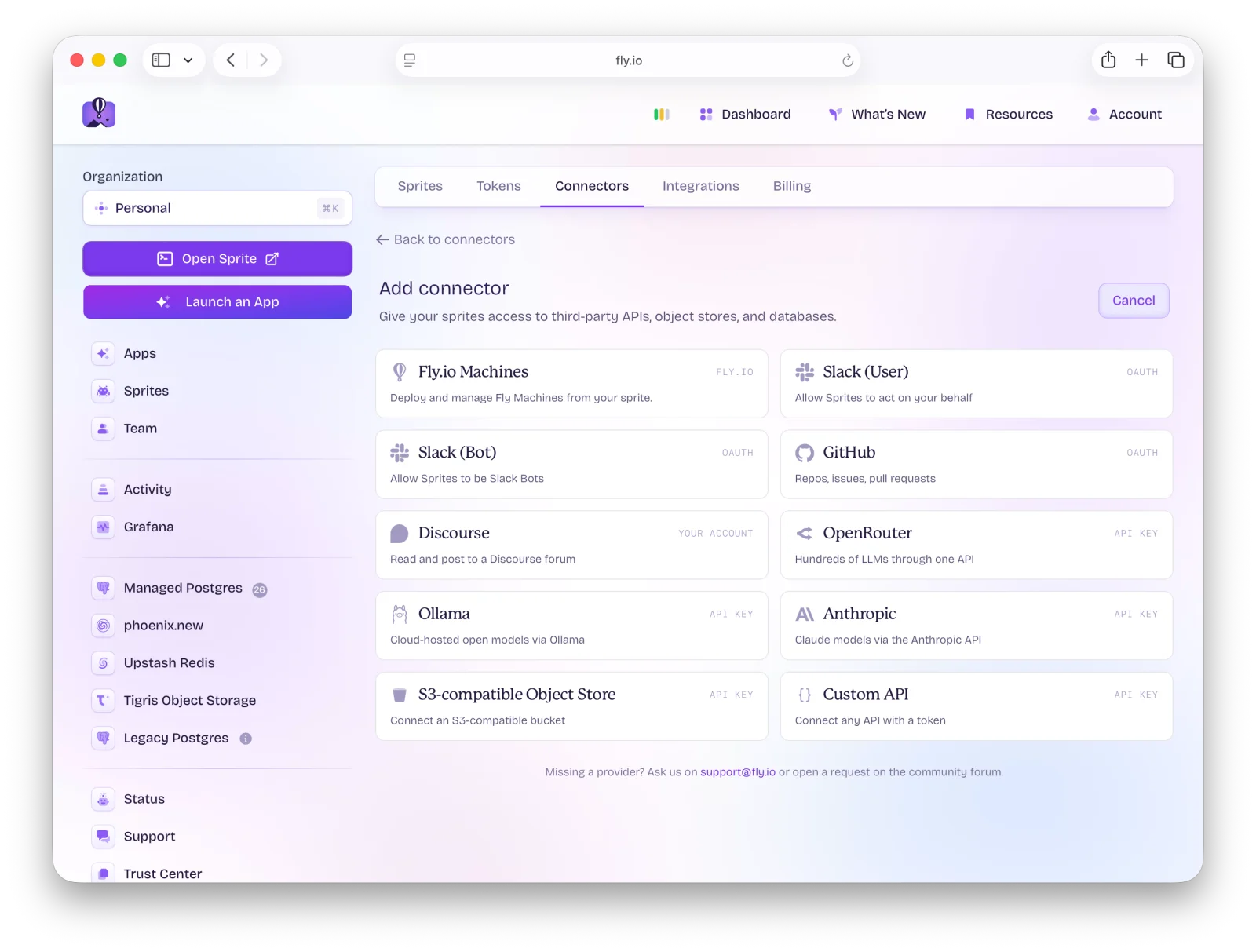
What happens next depends on the provider:
- GitHub — click Continue with GitHub. You’re sent through GitHub’s OAuth consent screen, then returned to your connectors list.
- OpenRouter — either Enable OpenRouter for the managed connector, or Use your own key instead and paste an OpenRouter API key.
- Anthropic and other API-key providers — paste the key. It’s validated against the provider before it’s saved, encrypted at rest, and never shown again.
- Discourse — enter the forum URL and choose Read-only or Read & write. Approve access on the forum in a new tab, then paste the code the forum displays back into the form.
- S3-compatible object store — enter the bucket, endpoint URL, region, access key ID, and secret access key. Click Test connection (a
HEADrequest against the bucket) before you can save. - Fly.io Machines — choose a read-only or read-write token scope and click Generate token. The token is created under your account and named
Sprite connector (…)so you can find it later under Tokens. - Custom API — fill in the base URL, the access token, and the authentication method. Then set a test URL and click Test connection. The Add connector button stays disabled until the test passes.
For Custom API connectors, the Authentication method decides where the token goes:
| Method | What the gateway sends |
|---|---|
| Header | Authorization: <prefix> <token>. The prefix defaults to Bearer; leave it blank to send the token verbatim. |
| URL path | A path template such as /bot{token} inserted between the base URL and the request path. {token} is replaced at request time. |
| Query param | The token appended as a query parameter (default name api_key). |
| Custom header | The token as the value of a header you name (default X-Api-Key). |
The optional Description on a Custom API connector isn’t just a label. It’s surfaced to coding agents through the gateway’s list endpoint, so a line like “Use /v1/chat/completions for chat” tells an agent how to use the API.
Newly created connectors show up in the list immediately. Until you grant access to at least one Sprite, the connector is dormant. It exists, but no Sprite can use it.
Configuring access
Section titled “Configuring access”Click any connector to open its detail page. This is where you control which Sprites can use it and what they can do with it.
The Access Configuration card has three controls:
- Name Prefix — only Sprites whose name starts with the value you set (for example,
prod-matchesprod-1andprod-api). - Sprite Labels — one label per line. Only Sprites that carry all the labels you list get access. Labels are set on the Sprite, not here.
- Allow all sprites — every Sprite in the organization. Checking it disables the other two fields, and the dashboard flags it as a broad permission.
You can combine name prefix and labels. Both must match. Allow-all overrides the others. Changes aren’t applied until you click Save.
The Authorized Sprites list below updates live as you edit the rules (it’s titled Matching Sprites while you have unsaved changes), so you can see exactly which Sprites will gain access before you save. Each Sprite in the list has a Test button that fires a real request from that Sprite through the gateway and reports success or failure with the round-trip time. It’s the fastest way to confirm the policy works end to end.
For OAuth connectors, the Scopes section shows what the provider granted. Click Add scope to pick more from the provider’s catalog, then Re-authorize to go back through the provider’s consent screen with the expanded set.
Other actions on the detail page:
- Edit API key rotates a BYOK key in place. The new key is validated before it replaces the old one.
- Edit connection and Clone connection on Custom API and object-store connectors. Cloning prefills a new form with everything except the secrets.
- Reauthorize on Discourse connectors. Forum-issued keys expire after a period of disuse (180 days by default), and the gateway returns
403once that happens. - Remove connection asks you to type the connector’s name. Deleting a connector destroys the credential and immediately cuts off every Sprite using it.
Calling a connector from a Sprite
Section titled “Calling a connector from a Sprite”Once the policy grants access, a Sprite calls the connector by hitting the gateway URL:
https://api.sprites.dev/v1/gateway/<provider>/<connection_id>/<path>No Authorization header. The gateway identifies the calling Sprite from Fly.io’s request signature. Whatever path and query string you append after the connector ID is forwarded to the provider with the stored credential attached. GET, HEAD, POST, PUT, PATCH, and DELETE are supported.
For example, if you set up a GitHub connector and granted access to Sprites with the github label:
curl -X POST "https://api.sprites.dev/v1/gateway/github/conn_gh789abc012/repos/acme/website/issues" \ -H "Content-Type: application/json" \ -d '{"title": "Flaky test in CI", "body": "Opened from a Sprite"}'An Anthropic connector works the same way. The gateway forwards anthropic-version and anthropic-beta, so the Anthropic SDK pointed at the gateway URL works as it does against the API directly:
curl -X POST "https://api.sprites.dev/v1/gateway/anthropic/<connection_id>/v1/messages" \ -H "Content-Type: application/json" \ -H "anthropic-version: 2023-06-01" \ -d '{"model": "claude-opus-5", "max_tokens": 1024, "messages": [{"role": "user", "content": "Hello!"}]}'The API Usage card on each connector’s detail page shows a ready-to-run example for that provider, so you don’t need to construct the URL by hand.
A few things to know about the gateway:
- Responses are buffered. The gateway reads the whole provider response before returning it, so streaming doesn’t stream. Leave
streamoff (or set it tofalse) on OpenAI-compatible and Anthropic requests, otherwise you get the whole event stream back in one buffered response. - Request headers are mostly not forwarded. The gateway sets
Content-Typeand its ownUser-Agent. Only provider-specific headers the connector opts into (such as Anthropic’s version headers, or the standard S3 request headers) pass through. - Rate-limit headers do come back. GitHub, OpenRouter, and Anthropic connectors forward their
*-ratelimit-*andretry-afterresponse headers. - Object-store requests keep their raw body. Uploads through an S3 connector can be up to 64 MB per request.
- Upstream timeout is 120 seconds.
Endpoint allow- and block-lists
Section titled “Endpoint allow- and block-lists”The access policy can also restrict which provider paths a Sprite can reach through the connector. This is useful when a connector has more permission than you want any single Sprite to use. A GitHub connector that can open issues and pull requests probably shouldn’t be able to call admin endpoints.
Patterns are exact paths or trailing-wildcard prefixes:
/repos/acme/website/issues— exactly that path./repos/*— anything starting with/repos/./*— everything (use sparingly).
There’s no mid-string globbing or regular expressions. Two lists work together:
- Allowed endpoints — if set, only matching paths are allowed. An empty list means no restriction.
- Blocked endpoints — matching paths are rejected. Block rules are checked before allow rules.
Managed OpenRouter
Section titled “Managed OpenRouter”Sprites can provision an OpenRouter key for your organization so you don’t need an OpenRouter account at all. Click Enable OpenRouter from the Connectors tab (or the Available services strip) and the connector appears under Managed by Sprites, available to every Sprite in the organization once you set an access policy.
Managed OpenRouter is prepaid. A newly provisioned key starts with a spending limit of zero, so the first step after enabling it is to buy credits:
- Click Buy credits on the connector card or detail page. Pick $10, $25, $50, $100, or enter a custom amount.
- Purchases are charged to your organization’s default card on file. If there isn’t one, the dialog sends you to Billing first.
- Credits are applied automatically once payment confirms, which can take a few minutes. The Credit purchases list on the detail page shows each purchase and its state.
The detail page shows Available credits and a Recent spend band with totals for the last 24 hours, 7 days, and 30 days. Spend figures come from gateway telemetry and are close to, but not the same as, the authoritative balance OpenRouter enforces.
When credits run out, requests fail with 403 and a message telling you where to top up. A 402 means the remaining balance can’t cover a single request’s max_tokens. Either lower max_tokens or buy more credits.
A managed connector otherwise behaves exactly like one you set up yourself: you still set an access policy, and the per-Sprite Test button still works. If you also have a bring-your-own-key OpenRouter connector, the managed one is created disabled so the two don’t compete. You can switch between them from the detail page.
Using connectors with a coding agent
Section titled “Using connectors with a coding agent”Every Sprite ships with the sprite-api-gateway skill pre-installed for Claude Code, Cursor, Codex, and Gemini. When a coding agent running inside a Sprite needs to talk to an external API, the skill kicks in automatically, so you don’t have to teach it any of the URLs above.
Ask in plain language:
“Comment ‘tests are green, ready to merge’ on GitHub PR #42 in acme/website.”
“Open a GitHub issue in my repo titled ‘flaky test’.”
“Summarize this file with Claude through our Anthropic connector.”
The agent discovers what’s available by calling the gateway list endpoint from inside the Sprite:
curl -s https://api.sprites.dev/v1/gateway/listThe response has two arrays. connections lists the connectors this Sprite is authorized to use, each with its gateway_base_url (already including the connection ID), a display_name, a description, a usage_snippet showing an example call, the granted scopes, and a manage_url for the dashboard. Custom API connectors also include their base_api_url and auth_method. available lists providers that could be connected but aren’t yet, with their default_scopes.
The agent picks the right connector, builds the call against the gateway, and never sees a raw token.
If an OAuth connector exists but is missing scopes the agent needs, the connection’s request_scopes_url points you at the re-authorization flow. A Sprite can also start that flow itself with GET /v1/gateway/authorize?provider=github&add_scopes=…, which returns an authorize_url for you to open. If no connector exists for the provider, the agent will ask you to add one from the dashboard.
The practical effect: once an organization admin has set up a GitHub connector and granted access to the right Sprites, anyone using a coding agent inside one of those Sprites can use the integration in natural language, with no API knowledge required.
Common errors
Section titled “Common errors”403 no access policy configured — connection denies all sprites by default
The connector has no access policy. Open the connector and grant access via labels, name prefix, or allow-all.
403 sprite is missing required labels: … or 403 sprite name must start with '…'
The connector has a policy, but the calling Sprite doesn’t match it. The message names the missing labels or the required prefix.
403 endpoint is blocked by policy or 403 endpoint is not in allowed list
The path matches a blocked endpoint, or an allowed-endpoints list is set and this path isn’t on it. Check both lists via the API.
401 could not verify sprite identity
The request didn’t arrive with valid Fly.io identity headers. Gateway calls must originate from inside a running Sprite, not from your laptop or CI.
404 no <provider> connection configured for this organization
The connection ID in the URL doesn’t exist in this Sprite’s organization, or has been deleted.
502 failed to reach <Provider> API
The gateway couldn’t connect to the provider. Retry, and check the provider’s status page if it persists.
403 with "credits_exhausted" or 402 with "credits_insufficient" from an OpenRouter connector
Your managed OpenRouter credits are used up, or too low for this request. Buy more credits from the connector page.
OAuth callback returns failed to exchange authorization code
The authorization code was already used or has expired. Restart the connection from the dashboard.
Automating with the API
Section titled “Automating with the API”Everything in the dashboard is also available as a REST API. Useful when you want to provision connectors as part of an org-setup script, or rotate them programmatically. These endpoints take a Sprites API token; only the gateway itself uses Sprite identity.
List providers
Section titled “List providers”curl "https://api.sprites.dev/v1/oauth/providers" \ -H "Authorization: Bearer $SPRITES_TOKEN"Returns each provider available to your organization with its display name, credential style, default scopes, and scope catalog.
Start an OAuth flow
Section titled “Start an OAuth flow”curl -X GET "https://api.sprites.dev/v1/oauth/github/authorize?scopes=repo,read:org" \ -H "Authorization: Bearer $SPRITES_TOKEN"Returns an authorize_url and a state. Send the user to the URL; on consent, GitHub redirects back to the Sprites callback and the connector is created. Pass add_scopes instead of scopes to merge new scopes into an existing connection’s grant.
Create an API-key (BYOK) connector
Section titled “Create an API-key (BYOK) connector”curl -X POST "https://api.sprites.dev/v1/oauth/connections/api_key" \ -H "Authorization: Bearer $SPRITES_TOKEN" \ -H "Content-Type: application/json" \ -d '{ "provider": "anthropic", "api_key": "sk-ant-...", "access_policy": { "allow_all": true } }'Works for openrouter and anthropic. The key is validated against the provider before it’s stored. Rotate it later with PUT /v1/oauth/connections/<id>/api_key.
Create a Custom API connector
Section titled “Create a Custom API connector”curl -X POST "https://api.sprites.dev/v1/oauth/connections/custom_api" \ -H "Authorization: Bearer $SPRITES_TOKEN" \ -H "Content-Type: application/json" \ -d '{ "name": "Telegram", "base_api_url": "https://api.telegram.org", "access_token": "123456:ABC...", "auth_method": "url_path", "auth_url_path_template": "/bot{token}", "test_url": "/getMe", "access_policy": { "sprite_labels": ["bots"] } }'name, base_api_url, access_token, and test_url are required. auth_method is one of header (default, with optional auth_header_prefix), url_path (with auth_url_path_template), query_param (with auth_query_param_name), or custom_header (with auth_custom_header_name). POST /v1/oauth/connections/custom_api/test takes the same body and verifies the credential without saving.
Create an object-store connector
Section titled “Create an object-store connector”curl -X POST "https://api.sprites.dev/v1/oauth/connections/object_store" \ -H "Authorization: Bearer $SPRITES_TOKEN" \ -H "Content-Type: application/json" \ -d '{ "name": "production-assets", "bucket": "assets", "endpoint_url": "https://<account>.r2.cloudflarestorage.com", "region": "auto", "access_key_id": "...", "secret_access_key": "...", "access_policy": { "name_prefix": "prod-" } }'Enable a managed connector
Section titled “Enable a managed connector”curl -X POST "https://api.sprites.dev/v1/oauth/connections/provision" \ -H "Authorization: Bearer $SPRITES_TOKEN" \ -H "Content-Type: application/json" \ -d '{ "provider": "openrouter" }'Credits are purchased from the dashboard. GET /v1/oauth/connections/<id>/balance returns the current limit, usage, and remaining balance, and GET /v1/oauth/connections/<id>/usage returns daily, weekly, and monthly spend with a per-model breakdown.
Update the access policy
Section titled “Update the access policy”curl -X PUT "https://api.sprites.dev/v1/oauth/connections/<id>" \ -H "Authorization: Bearer $SPRITES_TOKEN" \ -H "Content-Type: application/json" \ -d '{ "access_policy": { "sprite_labels": ["github"], "allowed_endpoints": ["/repos/*"] } }'The policy is replaced wholesale, so include every field you want to keep.
Test from a Sprite
Section titled “Test from a Sprite”curl -X POST "https://api.sprites.dev/v1/oauth/connections/<id>/test_gateway" \ -H "Authorization: Bearer $SPRITES_TOKEN" \ -H "Content-Type: application/json" \ -d '{ "sprite_name": "prod-1" }'Runs a real request from the named Sprite through the gateway and returns status, message, and latency_ms. This is what the Test button on the detail page calls.
List, inspect, delete
Section titled “List, inspect, delete”| Operation | Endpoint |
|---|---|
| List | GET /v1/oauth/connections (each entry includes sprite_count) |
| Get one | GET /v1/oauth/connections/:id |
| Delete | DELETE /v1/oauth/connections/:id |
Deleting a connector immediately revokes all Sprite access to it. The encrypted credential is destroyed and cannot be recovered. If the connector was OAuth, the user must re-authorize from the dashboard to recreate it.
For the full request and response schemas, see the API reference.